Your AI answers faster than you can read.

You’re not the reader anymore.

You’re the commander.

One window. Three surfaces.

Command every session from the Cockpit. Follow every reply in the Karaoke view. And Claude Code or Codex, right where it always was. It lives in VS Code.

Cockpit Karaoke view Your agent

One idea behind all of it: stop being the bottleneck, and your output stops waiting on you. 100+ features and counting.

Karaoke view · hear + speak

  • Every reply reads itself aloud, word by word.
  • Talk back; fast speech-to-text becomes the next prompt.
  • Hands free, eyes up.

Cockpit · orchestrate

  • Run several chats at once.
  • One heads-up display, the Cockpit, shows every chat’s status at a glance.
  • Replies queue to you in order; reprioritize on the fly.
  • Stop clicking through chats hunting for what’s next.

Claude Code or Codex · untouched

  • Claude Code or Codex stays exactly as it is. TUNLstack runs alongside it.
  • Download, and it starts reading.

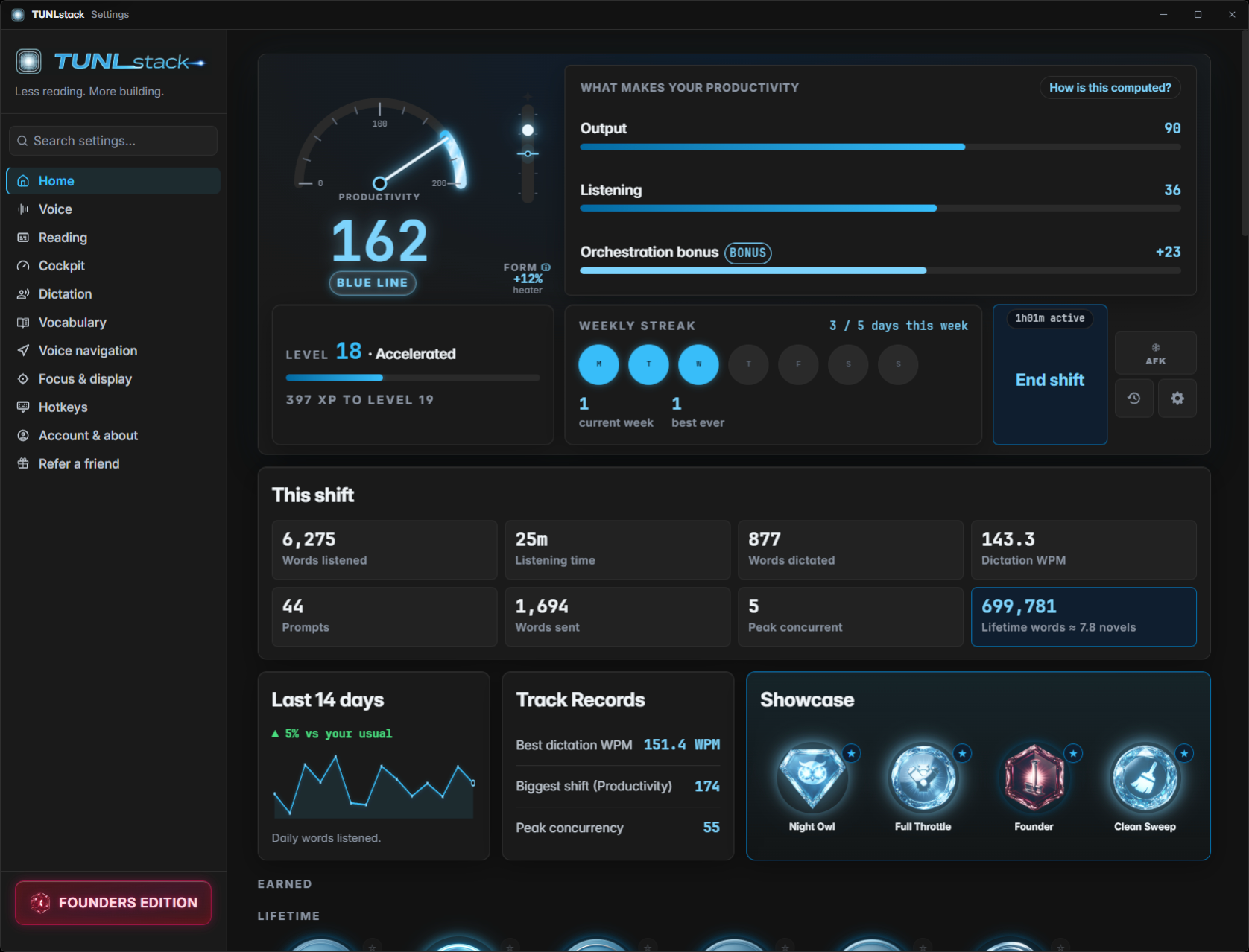
Dashboard · its own window

Your day gets a number.

The TUNLstack Dashboard, Home view: Productivity gauge, level and streaks, and live shift stats.
  • 11 voices; pick the one you want in your ear.
  • Set the pace: slower to catch it all, faster to fly.
  • Productivity climbs; streaks, levels, badges, measured live on your machine.

100shipped features

Ten ways to work faster.

So much is packed in. Every cluster is a different way to keep your hands off the keyboard and your eyes on the work.

The depth is the point. You grow into it, one feature at a time.

See all 100+ features soon
12 features

01Speak

Every AI reply reads itself aloud in a natural local voice.

19 features

02Listen & Queue

Five sessions in, one calm stream out — skip, park, replay, clear.

13 features

03Follow along

Karaoke surfaces light every spoken word, in-editor or over any app.

14 features

04Talk back

Hold one key, speak your reply, watch clean text type itself.

19 features

05Drive

Run the whole machine by hotkey, gamepad, and spoken command.

9 features

06Configure

Every knob in one settings window — voices, keys, bands, borders.

8 features

07Set up

Six guided steps and it's talking — free key, mic check, done.

4 features

08Own it

Buy once, yours to keep with the Founders Edition. The voice readout runs locally on your machine.

10 features

09Command your sessions

The Cockpit — every AI session on one board, pinned, ordered, and driven by voice.

12 features

10Your performance

Productivity, streaks, levels, and badges — your work, measured live on your own machine.

The standouts

Seventeen you'll feel on day one.

  • 01

    Auto-read replies aloud

    Every reply reads itself the moment it lands.

  • 02

    The operator key

    Play, pause, skip. Your whole remote control is one button.

  • 03

    11 voices, live previews

    Audition eleven narrators, pick your keeper.

  • 04

    Live volume + speed

    Change speed mid-read; the next sentence obeys.

  • 05

    Clean-listening filtering

    Hear the explanation, never the markup.

  • 06

    Ducks your music

    Your music steps aside, then steps back.

  • 07

    Karaoke-view control row

    A full transport deck under every reply.

  • 08

    Interrupt to dictate

    The voice never talks over you.

  • 09

    Your mic, your language

    Pick your mic, speak your language.

  • 10

    Dictation history

    Said it an hour ago? Still there.

  • 11

    Push-to-talk navigation

    Hold one button, run the whole PC.

  • 12

    Playback voice commands

    Steer the voice with your voice.

  • 13

    Free 8-day trial

    Eight days. Every feature. No card.

  • 14

    Buy once, yours to keep

    Buy it once. Yours to keep.

  • 15

    Ladder reorder

    Drag sessions into a custom playback order.

  • 16

    Live status + timers

    See each session's state and how long it's worked.

  • 17

    Per-window queue order

    Each window starts in the order you choose.

01 / 17

Read every reply aloud in eleven local voices, dictate hands-free with one key, click any pixel by number, run all your sessions from a single Cockpit, snip a screenshot into the right chat, duck your music mid-sentence, replay any turn on encore, park a runaway agent, jump to the latest message, follow along in karaoke, drive the whole board by voice, and watch your Productivity climb.

Buy once. Yours to keep.

The competing tools bill you every month: this is one quiet number, paid one time, then TUNLstack just runs.

vs

Founders Edition · paid once

$49

USD · one‑time

One price, every feature · no tiers, no upgrade fee


Free 8-day trial of the whole app — nothing held back, no feature gates.

No card, no commitment.

Buy once. Yours to keep Windows desktop $49, one time

Stop shipping what you didn't read.

Reading became the bottleneck. We built the bypass. Three keys — talk to it, steer it, move through it. That's the whole learning curve.

Three keys. Start. · Windows 10 & 11 · buy once, yours to keep